Key Features
Eager search spaces
Automated search for optimal hyperparameters using Python conditionals, loops, and syntax
State-of-the-art algorithms
Efficiently search large spaces and prune unpromising trials for faster results
Easy parallelization

Parallelize hyperparameter searches over multiple threads or processes without modifying code
Getting Started
Installation
Code Examples
Optuna is framework agnostic. You can use it with any machine learning or deep learning framework.


A simple optimization problem:
- Define
objectivefunction to be optimized. Let's minimize(x - 2)^2 - Suggest hyperparameter values using
trialobject. Here, a float value ofxis suggested from-10to10 - Create a
studyobject and invoke theoptimizemethod over 100 trials
import optuna

def objective(trial):
    x = trial.suggest_float('x', -10, 10)
    return (x - 2) ** 2

study = optuna.create_study()
study.optimize(objective, n_trials=100)

study.best_params # E.g. {'x': 2.002108042}You can optimize PyTorch hyperparameters, such as the number of layers and the number of hidden nodes in each layer, in three steps:
- Wrap model training with an
objectivefunction and return accuracy - Suggest hyperparameters using a
trialobject - Create a
studyobject and execute the optimization
import torch

import optuna

# 1. Define an objective function to be maximized.
def objective(trial):

    # 2. Suggest values of the hyperparameters using a trial object.
    n_layers = trial.suggest_int('n_layers', 1, 3)
    layers = []

    in_features = 28 * 28
    for i in range(n_layers):
        out_features = trial.suggest_int(f'n_units_l{i}', 4, 128)
        layers.append(torch.nn.Linear(in_features, out_features))
        layers.append(torch.nn.ReLU())
        in_features = out_features
    layers.append(torch.nn.Linear(in_features, 10))
    layers.append(torch.nn.LogSoftmax(dim=1))
    model = torch.nn.Sequential(*layers).to(torch.device('cpu'))
    ...
    return accuracy

# 3. Create a study object and optimize the objective function.
study = optuna.create_study(direction='maximize')
study.optimize(objective, n_trials=100)You can optimize TensorFlow hyperparameters, such as the number of layers and the number of hidden nodes in each layer, in three steps:
- Wrap model training with an
objectivefunction and return accuracy - Suggest hyperparameters using a
trialobject - Create a
studyobject and execute the optimization
import tensorflow as tf

import optuna

# 1. Define an objective function to be maximized.
def objective(trial):

    # 2. Suggest values of the hyperparameters using a trial object.
    n_layers = trial.suggest_int('n_layers', 1, 3)
    model = tf.keras.Sequential()
    model.add(tf.keras.layers.Flatten())
    for i in range(n_layers):
        num_hidden = trial.suggest_int(f'n_units_l{i}', 4, 128, log=True)
        model.add(tf.keras.layers.Dense(num_hidden, activation='relu'))
    model.add(tf.keras.layers.Dense(CLASSES))
    ...
    return accuracy

# 3. Create a study object and optimize the objective function.
study = optuna.create_study(direction='maximize')
study.optimize(objective, n_trials=100)You can optimize Keras hyperparameters, such as the number of filters and kernel size, in three steps:
- Wrap model training with an
objectivefunction and return accuracy - Suggest hyperparameters using a
trialobject - Create a
studyobject and execute the optimization
import keras

import optuna

# 1. Define an objective function to be maximized.
def objective(trial):
    model = Sequential()

    # 2. Suggest values of the hyperparameters using a trial object.
    model.add(
        Conv2D(filters=trial.suggest_categorical('filters', [32, 64]),
               kernel_size=trial.suggest_categorical('kernel_size', [3, 5]),
               strides=trial.suggest_categorical('strides', [1, 2]),
               activation=trial.suggest_categorical('activation', ['relu', 'linear']),
               input_shape=input_shape))
    model.add(Flatten())
    model.add(Dense(CLASSES, activation='softmax'))

    # We compile our model with a sampled learning rate.
    lr = trial.suggest_float('lr', 1e-5, 1e-1, log=True)
    model.compile(loss='sparse_categorical_crossentropy', optimizer=RMSprop(lr=lr), metrics=['accuracy'])
    ...
    return accuracy

# 3. Create a study object and optimize the objective function.
study = optuna.create_study(direction='maximize')
study.optimize(objective, n_trials=100)
You can optimize Scikit-Learn hyperparameters, such as the C parameter of
SVC and the max_depth of the RandomForestClassifier,
in
three steps:
- Wrap model training with an
objectivefunction and return accuracy - Suggest hyperparameters using a
trialobject - Create a
studyobject and execute the optimization
import sklearn

import optuna

# 1. Define an objective function to be maximized.
def objective(trial):

    # 2. Suggest values for the hyperparameters using a trial object.
    classifier_name = trial.suggest_categorical('classifier', ['SVC', 'RandomForest'])
    if classifier_name == 'SVC':
         svc_c = trial.suggest_float('svc_c', 1e-10, 1e10, log=True)
         classifier_obj = sklearn.svm.SVC(C=svc_c, gamma='auto')
    else:
        rf_max_depth = trial.suggest_int('rf_max_depth', 2, 32, log=True)
        classifier_obj = sklearn.ensemble.RandomForestClassifier(max_depth=rf_max_depth, n_estimators=10)
    ...
    return accuracy

# 3. Create a study object and optimize the objective function.
study = optuna.create_study(direction='maximize')
study.optimize(objective, n_trials=100)You can optimize XGBoost hyperparameters, such as the booster type and alpha, in three steps:
- Wrap model training with an
objectivefunction and return accuracy - Suggest hyperparameters using a
trialobject - Create a
studyobject and execute the optimization
import xgboost as xgb

import optuna

# 1. Define an objective function to be maximized.
def objective(trial):
    ...

    # 2. Suggest values of the hyperparameters using a trial object.
    param = {
        "objective": "binary:logistic",
        "booster": trial.suggest_categorical("booster", ["gbtree", "gblinear", "dart"]),
        "lambda": trial.suggest_float("lambda", 1e-8, 1.0, log=True),
        "alpha": trial.suggest_float("alpha", 1e-8, 1.0, log=True),
        "subsample": trial.suggest_float("subsample", 0.2, 1.0),
        "colsample_bytree": trial.suggest_float("colsample_bytree", 0.2, 1.0),
    }

    bst = xgb.train(param, dtrain)
    ...
    return accuracy

# 3. Create a study object and optimize the objective function.
study = optuna.create_study(direction='maximize')
study.optimize(objective, n_trials=100)You can optimize LightGBM hyperparameters, such as boosting type and the number of leaves, in three steps:
- Wrap model training with an
objectivefunction and return accuracy - Suggest hyperparameters using a
trialobject - Create a
studyobject and execute the optimization
import lightgbm as lgb

import optuna

# 1. Define an objective function to be maximized.
def objective(trial):
    ...

    # 2. Suggest values of the hyperparameters using a trial object.
    param = {
        'objective': 'binary',
        'metric': 'binary_logloss',
        'verbosity': -1,
        'boosting_type': 'gbdt',
        'lambda_l1': trial.suggest_float('lambda_l1', 1e-8, 10.0, log=True),
        'lambda_l2': trial.suggest_float('lambda_l2', 1e-8, 10.0, log=True),
        'num_leaves': trial.suggest_int('num_leaves', 2, 256),
        'feature_fraction': trial.suggest_float('feature_fraction', 0.4, 1.0),
        'bagging_fraction': trial.suggest_float('bagging_fraction', 0.4, 1.0),
        'bagging_freq': trial.suggest_int('bagging_freq', 1, 7),
        'min_child_samples': trial.suggest_int('min_child_samples', 5, 100),
    }

    gbm = lgb.train(param, dtrain)
    ...
    return accuracy

# 3. Create a study object and optimize the objective function.
study = optuna.create_study(direction='maximize')
study.optimize(objective, n_trials=100)
Check more examples including PyTorch Ignite, Dask-ML and MLFlow at our GitHub
repository.
It also provides the visualization demo as follows:
from optuna.visualization import plot_intermediate_values

...
plot_intermediate_values(study)
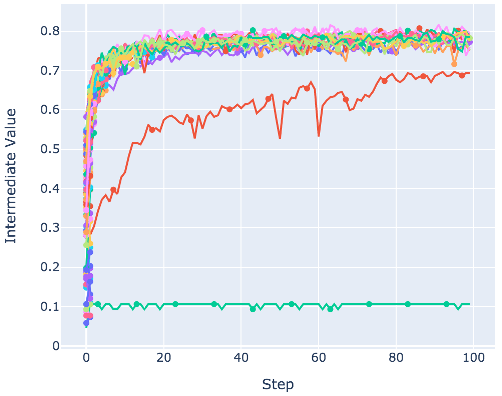
Rustuna
Rustuna is a faster implementation of Optuna written in Rust. It keeps the API you already know, and rewrites the parts that start to hurt at scale: sampling speed and memory efficiency.
-
Faster sampler implementations Rustuna supports TPE, MOTPE, NSGA-II, and CMA-ES, and finishes the same study several times to several hundred times faster for cheap objective functions.
-
Memory-efficient storage Several design choices make Rustuna's storage memory-efficient. Furthermore, discarding unneeded trial history prevents memory usage and runtime from increasing as the number of trials grows.
-
Zero Python runtime dependencies No Python runtime dependencies by default — dramatically faster imports, and far less exposure to supply chain attacks.
Dashboard
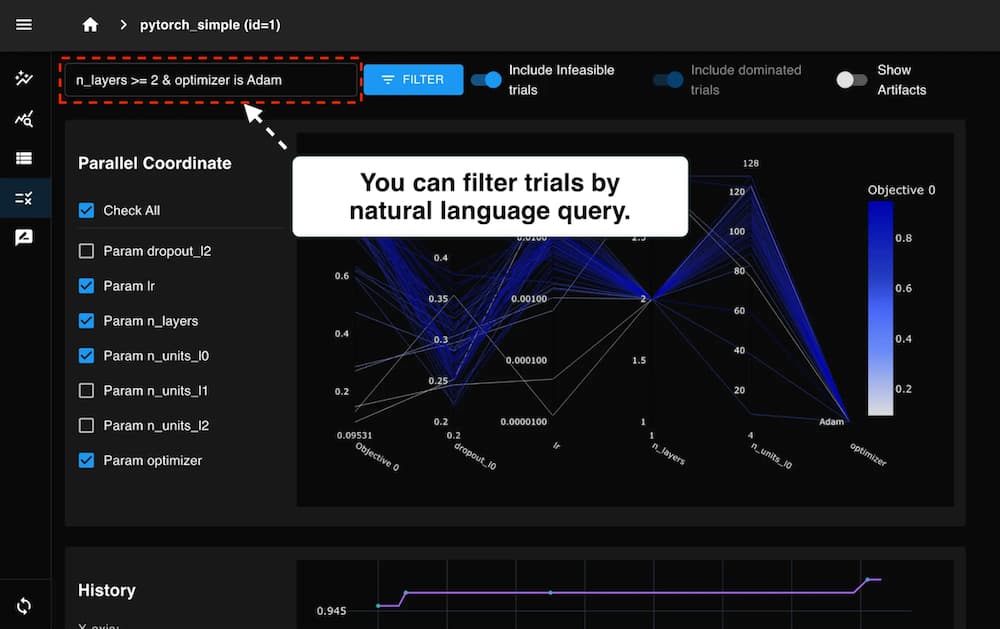
Optuna Dashboard is a real-time web dashboard for Optuna. You can check the optimization history, hyperparameter importances, etc. in graphs and tables.
% pip install optuna-dashboard
% optuna-dashboard sqlite:///db.sqlite3
Optuna Dashboard is also available as extensions for Jupyter Lab and Visual Studio Code.
GitHub Repository Documentation VS Code Extension (Marketplace)OptunaHub
OptunaHub is a feature-sharing platform for Optuna. Users can freely use registered features, and contributors can register the features they implement. The following example uses AutoSampler on OptunaHub, which automatically selects a proper sampler from those implemented in Optuna.
% pip install optunahub
% pip install cmaes scipy torch  # install AutoSampler dependencies
import optuna
import optunahub
def objective(trial: optuna.Trial) -> float:
x = trial.suggest_float("x", -5, 5)
y = trial.suggest_float("y", -5, 5)
return x**2 + y**2
module = optunahub.load_module(package="samplers/auto_sampler")
study = optuna.create_study(sampler=module.AutoSampler())
study.optimize(objective, n_trials=50)
print(study.best_trial.value, study.best_trial.params)Blog
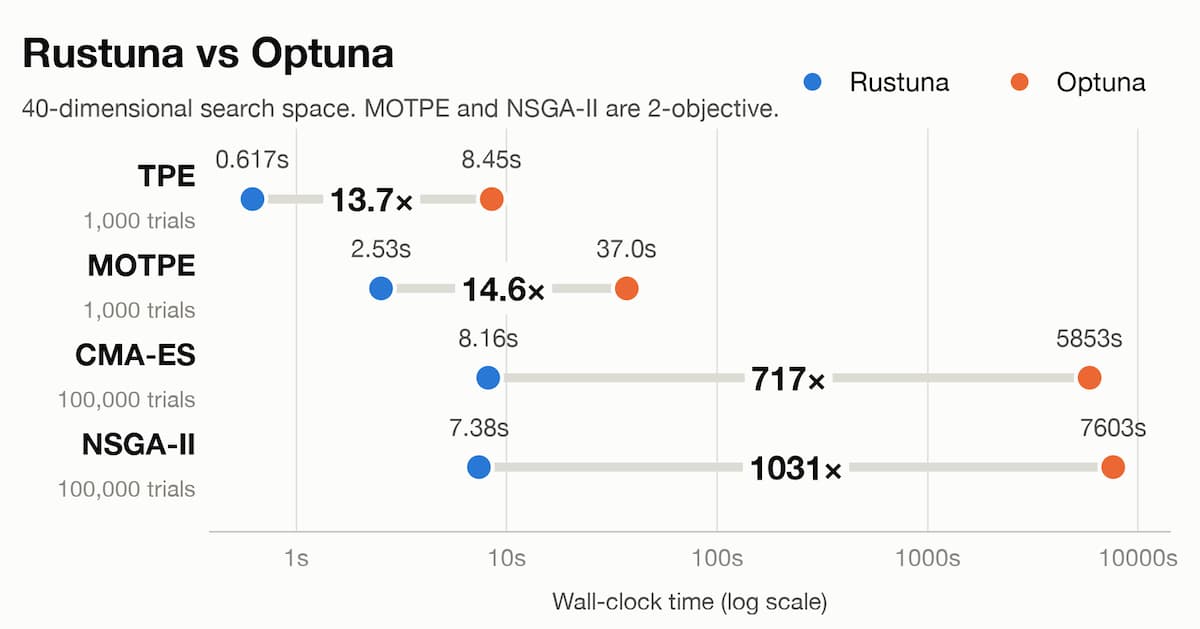 We have developed and released Rustuna, a faster Optuna implementation built with Rust.
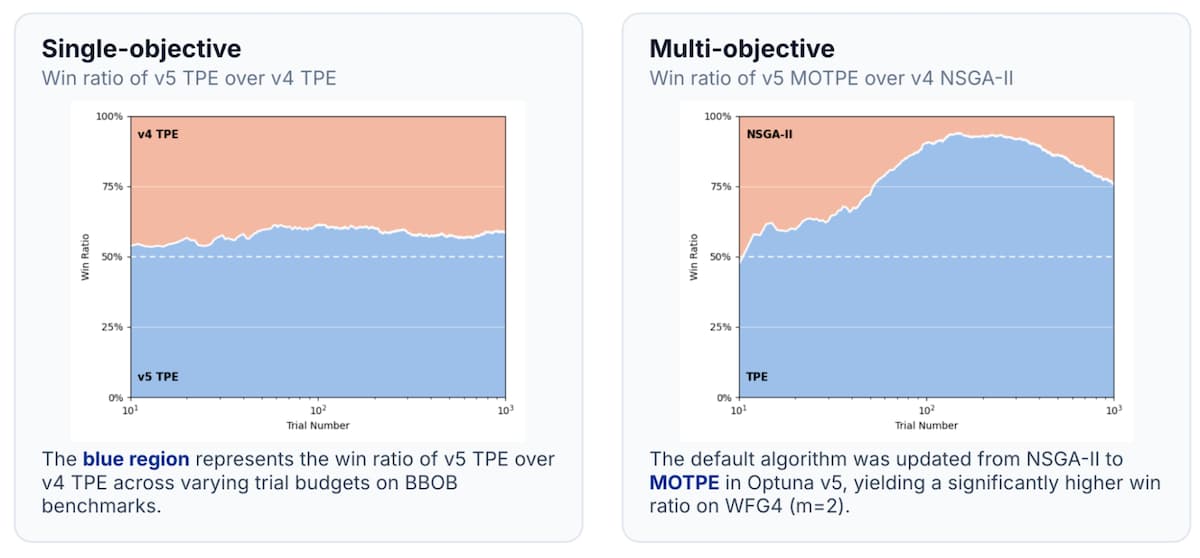 This post introduces the major updates in Optuna v5 individually.
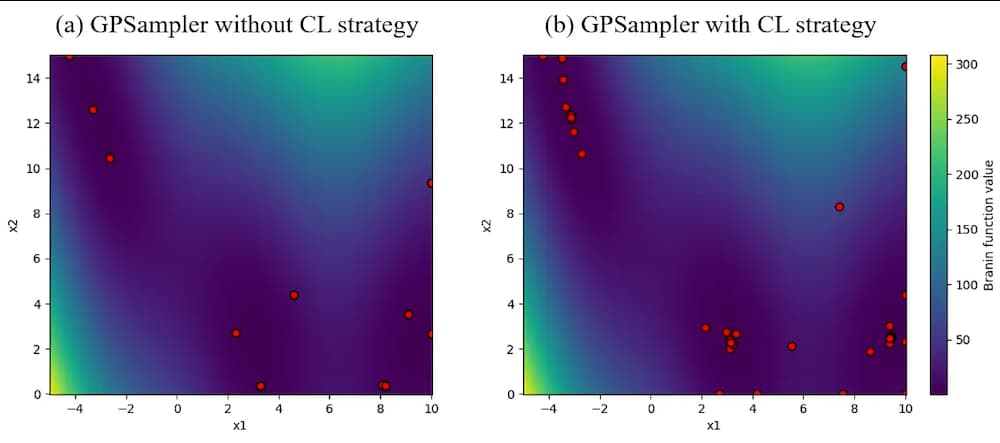 In this article, we will introduce the parallelization enhancements for GPSampler scheduled for release in Optuna v4.8 and v4.9.
 As introduced in the Optuna v5 roadmap, Optuna is currently enhancing its integration with large language models (LLMs) for its next major release.
Papers
Optuna
If you use Optuna in a scientific publication, please use the following citation:
Takuya Akiba, Shotaro Sano, Toshihiko Yanase, Takeru Ohta, and Masanori Koyama. 2019.
	Optuna: A Next-generation Hyperparameter Optimization Framework. In KDD.
Bibtex entry:
@inproceedings{optuna_2019,
	title={Optuna: A Next-generation Hyperparameter Optimization Framework},
	author={Akiba, Takuya and Sano, Shotaro and Yanase, Toshihiko and Ohta, Takeru and Koyama, Masanori},
	booktitle={Proceedings of the 25th {ACM} {SIGKDD} International Conference on Knowledge Discovery and Data Mining},
	year={2019}
}
View
Paper
arXiv
Preprint
OptunaHub
If you use OptunaHub in a scientific publication, please use the following citation:
Yoshihiko Ozaki, Shuhei Watanabe, and Toshihiko Yanase. 2026.
	OptunaHub: A Platform for Black-Box Optimization. Journal of Machine Learning Research.
Bibtex entry:
@article{JMLR:v27:25-2424,
  author  = {Yoshihiko Ozaki and Shuhei Watanabe and Toshihiko Yanase},
  title   = {OptunaHub: A Platform for Black-Box Optimization},
  journal = {Journal of Machine Learning Research},
  year    = {2026},
  volume  = {27},
  number  = {203},
  pages   = {1--10},
  url     = {http://jmlr.org/papers/v27/25-2424.html}
}
View
Paper
arXiv
Preprint